Introduction to OData
OData (Open Data Protocol) is a standard protocol established by OASIS for creating and consuming RESTful APIs. It is designed to simplify the development and consumption of APIs by providing a consistent way to query and manipulate data. OData helps developers focus on business logic rather than the nuances of API implementation, such as request and response headers, status codes, HTTP methods, URL conventions, and query options.
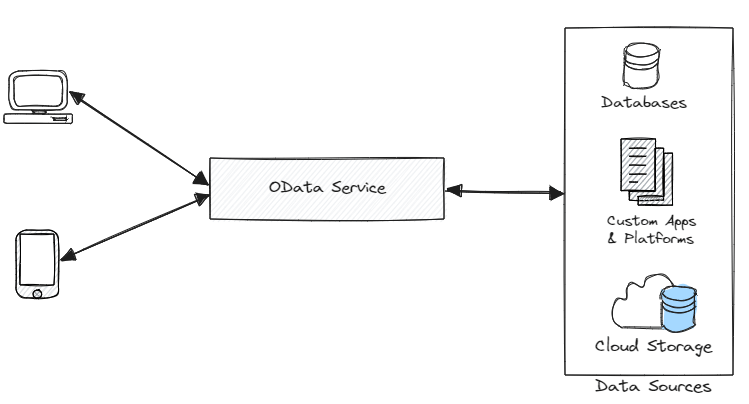
Key Features of OData
- Uniform Interface: OData offers a standardized way to interact with data models. This includes CRUD (Create, Read, Update, Delete) operations and complex queries using a consistent URL structure and query options.
- Metadata: OData services provide metadata, a machine-readable description of the data model, which makes it easier for clients to understand the structure and types of the data they are interacting with.
- Query Options: OData supports powerful query options such as
$filter,$select,$expand,$orderby,$skip, and$topto perform complex data operations directly in the URL. - Function and Actions: OData allows defining functions (read-only operations) and actions (operations that modify data) to encapsulate server-side logic that can be reused by clients.
- Batch Processing: OData supports batch requests, allowing multiple operations to be sent in a single HTTP request, reducing the number of network calls.
- Change Tracking: OData services can track changes and provide delta links to clients, which allows efficient synchronization of data.
OData in Practice
Below is an example of how to use OData with ASP.NET Core to build an API for managing company and product data.
- Setup: First, configure your project to use OData by installing necessary packages and setting up your
Startup.csorProgram.csfile to include OData services. - Data Model: Define your data models, such as
CompanyandProduct.
public class Company
{
    public int ID { get; set; }
    public string Name { get; set; }
    public ICollection<Product> Products { get; set; }
}

public class Product
{
    public int ID { get; set; }
    public string Name { get; set; }
    public decimal Price { get; set; }
    public int CompanyID { get; set; }
}
- Database Context: Set up your database context to manage the data models.
public class ApiContext : DbContext
{
    public ApiContext(DbContextOptions<ApiContext> options) : base(options) { }

    public DbSet<Company> Companies { get; set; }
    public DbSet<Product> Products { get; set; }
}
- Repository: Implement a repository pattern for data access.
public class CompanyRepo : ICompanyRepo
{
    private readonly ApiContext _context;
    public CompanyRepo(ApiContext context) { _context = context; }

    public IQueryable<Company> GetAll() => _context.Companies.Include(c => c.Products).AsQueryable();
    public IQueryable<Company> GetById(int id) => _context.Companies.Include(c => c.Products).Where(c => c.ID == id);
    public void Create(Company company) { _context.Companies.Add(company); _context.SaveChanges(); }
    public void Update(Company company) { _context.Companies.Update(company); _context.SaveChanges(); }
    public void Delete(Company company) { _context.Companies.Remove(company); _context.SaveChanges(); }
}
- Controller: Create a controller to handle HTTP requests using OData.
[Route("api/[controller]")]
[ApiController]
public class CompaniesController : ControllerBase
{
    private readonly ICompanyRepo _repo;
    public CompaniesController(ICompanyRepo repo) { _repo = repo; }

    [EnableQuery]
    [HttpGet]
    public IQueryable<Company> Get() => _repo.GetAll();

    [EnableQuery]
    [HttpGet("{id}")]
    public SingleResult<Company> Get([FromODataUri] int key) => SingleResult.Create(_repo.GetById(key));

    [HttpPost]
    public IActionResult Post([FromBody] Company company)
    {
        if (!ModelState.IsValid) return BadRequest(ModelState);
        _repo.Create(company);
        return Created("companies", company);
    }

    [HttpPut]
    public IActionResult Put([FromODataUri] int key, [FromBody] Company company)
    {
        if (!ModelState.IsValid) return BadRequest(ModelState);
        if (key != company.ID) return BadRequest();
        _repo.Update(company);
        return NoContent();
    }

    [HttpDelete]
    public IActionResult Delete([FromODataUri] int key)
    {
        var company = _repo.GetById(key).FirstOrDefault();
        if (company == null) return NotFound();
        _repo.Delete(company);
        return NoContent();
    }
}
- OData Configuration: Register OData routes in your
Startup.cs.
public void ConfigureServices(IServiceCollection services)
{
    services.AddControllers().AddOData(opt => opt.Select().Filter().Expand().OrderBy().Count().SetMaxTop(100).AddRouteComponents("odata", GetEdmModel()));
}

private static IEdmModel GetEdmModel()
{
    ODataConventionModelBuilder builder = new();
    builder.EntitySet<Company>("Companies");
    builder.EntitySet<Product>("Products");
    return builder.GetEdmModel();
}
OData offers a robust framework for building and consuming RESTful APIs with a standardized approach to querying and manipulating data. Its comprehensive feature set, including query options, metadata, and batch processing, makes it a powerful tool for API development, enabling developers to create flexible and efficient data-driven applications.
 FactorBytes
Leave a comment